Terminologies#
About Regions#
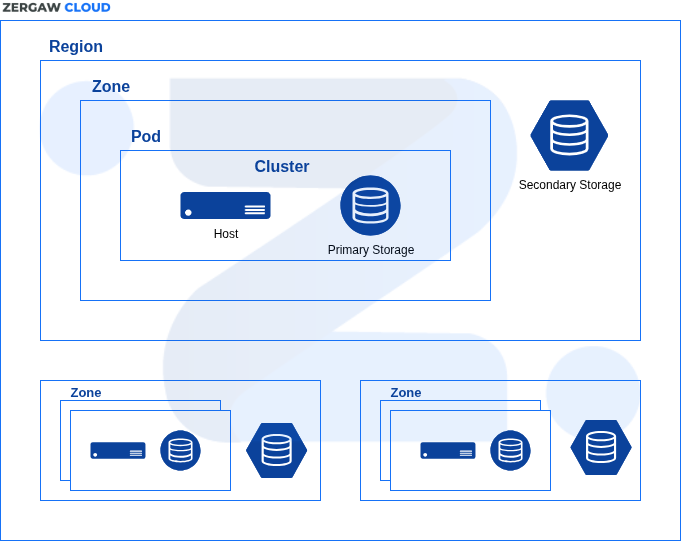
To increase reliability of the cloud, resources are grouped into multiple geographic regions. A region is the largest available organizational unit within a Zergaw CloudStack deployment. A region is made up of several availability zones, where each zone is roughly equivalent to a datacenter. Regions are a useful technique for providing fault tolerance and disaster recovery.
Note
Currently Zergaw Cloudstack has one region operating in Ethiopia.
About Zones#
A zone is the second largest organizational unit within a Zergaw CloudStack deployment. A zone typically corresponds to a single datacenter, although it is permissible to have multiple zones in a datacenter. The benefit of organizing infrastructure into zones is to provide physical isolation and redundancy. For example, each zone can have its own power supply and network uplink, and the zones can be widely separated geographically (though this is not required).
A zone consists of:
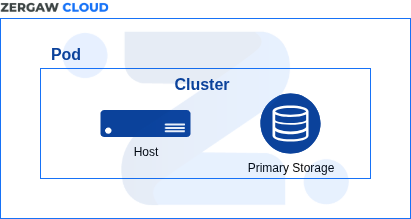
One or more pods. Each pod contains one or more clusters of hosts and one or more primary storage servers.
A zone may contain one or more primary storage servers, which are shared by all the pods in the zone.
Secondary storage, which is shared by all the pods in the zone.
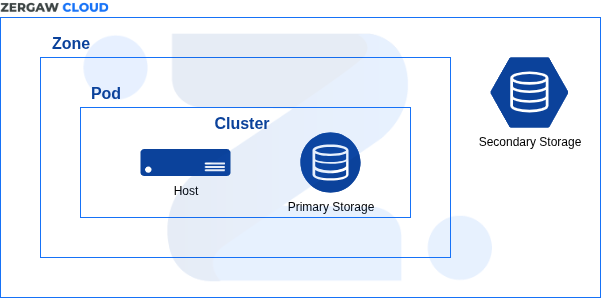
Zones are visible to the end user. When a user starts a Guest Instance, the user must select a zone for their guest. Users might also be required to copy their private Templates to additional zones to enable creation of Guest Instances using their Templates in those zones.
Zones can be public or private. Public zones are visible to all users. This means that any user may create a guest in that zone. Private zones are reserved for a specific domain. Only users in that domain or its subdomains may create guests in that zone.
Hosts in the same zone are directly accessible to each other without having to go through a firewall. Hosts in different zones can access each other through statically configured VPN tunnels.
About Pods#
A pod often represents a single rack. Hosts in the same pod are in the same subnet. A pod is the third-largest organizational unit within a Zergaw CloudStack deployment. Pods are contained within zones. Each zone can contain one or more pods. A pod consists of one or more clusters of hosts and one or more primary storage servers. Pods are not visible to the end user.
About Clusters#
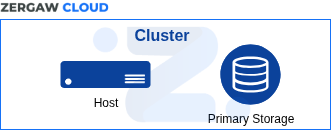
A cluster provides a way to group hosts. To be precise, a cluster is a XenServer server pool, a set of KVM servers or a VMware cluster preconfigured in vCenter. The hosts in a cluster all have identical hardware, run the same hypervisor, are on the same subnet, and access the same shared primary storage. Instances can be live-migrated from one host to another within the same cluster, without interrupting service to the user.
A cluster is the fourth-largest organizational unit within a Zergaw CloudStack deployment. Clusters are contained within pods, and pods are contained within zones.
About Hosts#
A host is a single server. Hosts provide the computing resources that run Guest Instances. Each host has hypervisor software installed on it to manage the Guest Instances. For example, a host can be a Citrix XenServer server, a Linux KVM-enabled server, an ESXi server, or a Windows Hyper-V server.
The host is the smallest organizational unit within a Zergaw CloudStack deployment. Hosts are contained within clusters, clusters are contained within pods, pods are contained within zones, and zones can be contained within regions.
Hosts in a Zergaw CloudStack deployment:
Provide the CPU, memory, storage, and networking resources needed to host the Instances
Interconnect using a high bandwidth TCP/IP network and connect to the Internet
May reside in multiple data centers across different geographic locations
May have different capacities (different CPU speeds, different amounts of RAM, etc.), although the hosts within a cluster must all be homogeneous
Additional hosts can be added at any time to provide more capacity for Guest Instances.
Zergaw CloudStack automatically detects the amount of CPU and memory resources provided by the hosts.
Hosts are not visible to the end user. An end user cannot determine which host their guest has been assigned to.
About Primary Storage#
Primary storage is associated with a cluster, and it stores virtual disks for all the Instances running on hosts in that cluster.
About Secondary Storage#
Secondary storage stores the following:
Templates — OS images that can be used to boot Instances and can include additional configuration information, such as installed applications
ISO images — disc images containing data or bootable media for operating systems
Disk Volume Snapshots — saved copies of Instance data which can be used for data recovery or to create new Templates
About Object Storage#
Object storage (also known as object-based storage) is a data storage that manages data as objects. Users can create buckets within the object storage pool. The basic storage units of Object Store are objects. Any type of data, regardless of content type, is stored as an object. Buckets are logical containers for storing objects.